See the end of this page for a PDF version of this guide.
Find the student’s file or card--Home Base
If you are searching the CISDRC for all materials related to one student, you should first start by locating their student information card and/or student file. From this help page there are two ways to do this—searching with the site-wide search box on the left-side navigation bar, or searching on the Student Records page itself (click through under Find). If the person you are looking for attended the school, some of the first results for your search should include posts titled “[person’s name] Student File” or “[person’s name] Student Information Card.” Click on one of those to get started.
Please be aware that the name you use to search and the name that is used by our site may be different. To make sure that a student’s records are easy to find, the CISDRC uses one name across all of our descriptions/metadata (even if the records themselves used different names for that student). However, all names and spelling variations we have found in the CIS records are listed on the student’s main entry post (either a student file or a student card). This means that if you are searching with one of those names or spellings, at least one card or file should show up in your search. Please be aware also that there may be multiple students who enrolled under the same name. In that case, you’ll need to look at other details (like year of entry) to help narrow it down. For tips on troubleshooting the search functions on this site, particularly for names, go to Troubleshooting the Search at https://carlisleindian.dickinson.edu/node/33361/.
Leaving Home Base
Once you have found the student information card(s) or file, you have a kind of “home base” for your research. All the documents in the student file and all the information on the student information cards are going to be about your student-of-interest. From here you can branch out into other material that may mention or connect to your person.
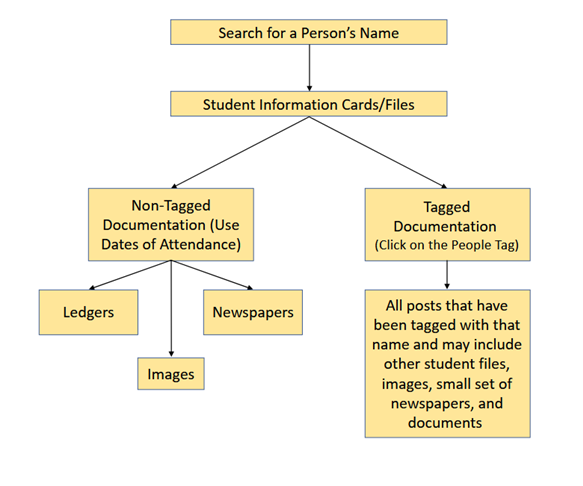
There are two paths you might take. One path is to use the student’s “People” tag and the second path is to look for material that has not been tagged with the student’s name but contains other clues.
First Path: Student’s Tag
When you are at “home base”—an information card or student file—you can find a student’s tag in the “People” category. The person’s name will be listed “last name, first name” and be underlined as a hyperlink. A person’s tag compiles anything that mentions a given person into one list. This list encompasses material from the entire site so when you click on the link you may see photographs, letters, and/or newspapers. Any one person’s tag may have from two or three to 20-30 posts linked to it.
But the tagging for any one person is not comprehensive. This is partially because the CISDRC is a work in progress. For example, only a small selection of newspapers have had their contents described and tagged by a member of the project staff. There are also some connections that cannot be made without certain background—especially in cases where a document does not name a person or uses only a person’s first name. For instance, a letter may refer to a Pueblo student who left the school recently. Based on your knowledge of when your student-of-interest left, you may be able to assume that that Pueblo student is your student-of-interest. Without that background knowledge, CISDRC staff do not know that that document should be tagged with your student-of-interest's name.
To go beyond your student's tagged material you can come back to your home base—the student file or information cards--and then strike out on the other path.
Second Path: Non-tagged Documentation
This second path leads you into all documentation that has not been tagged. To make it easier, first and foremost, you should keep track of when your student attended Carlisle. While there are mentions of former students in different newspapers or incidentally in a letter from elsewhere, most of the documentation about the students on the CISDRC was created while they attended Carlisle. And, when you plan to venture, for instance, into the over 1,700 different issues of school newspapers, it is much faster to look through 2- or 3-years’ worth of newspapers than it is 2 or 3 decades. When you are recording the student’s dates of attendance keep in mind that not all students came on one day and left on another. While students generally did not go home for summer, they could come and go from the school on “outing” during which they worked off campus. Some did take a leave (often for family or health reasons), and some left, but reenrolled later. In cases where the student re-enrolled, check for this sentence in their student file’s description: “The student did not attend the school continuously but left and reentered.” When you look at their file/card these kinds of comings and goings will either be noted on the card itself (in the section “to country” if they went on outing or leave) or with the existence of a new card entirely if they were re-admitted.
All the information you find can help open different paths to new information. For example, if you find a clipping that mentions that your student-of-interest was elected as an officer of the Standard Debating Society, you can return to all of the publications, ledgers, and images from that time period with fresh eyes. There may be a photograph of the Society during the time that your person was at the school. There may also be stories in the newspapers about events hosted by the Society that would not have surfaced in a search of your student’s name because they are not mentioned, but now you can assume that they would have been part of it.
Each of the categories in the Find Menu have different types of tagged and non-tagged material.
Student Records
These records have been well tagged so if the file does not show up on a student’s tag, you can probably assume that no other student records mention them by name. That said, it may still be of interest to look at the files for other students who arrived with your student-of-interest or other students from their Nation or Agency. If you want to see records of students who arrived at the same time, you can copy their date of entry (e.g. February 4, 1881) into the search bar in the upper right corner on the Student Records landing page. Or, if you are interested in more general connections, you can click one of the tags on the student's page for Nation, Agency/Reservation of Origin, or Year of Entry.
Images
This is another case where it is likely that if there is an image in which your student-of-interest has been identified, it will be tagged. However, there are many images that do not have identification for the people involved. You can use the sort and search functions on the landing page to help you narrow things down. If there are no names, it is possible that a photograph included identification by Nation. Choosing a specific year might help, too.
Publications
When you look through publications keep in mind that not one newspaper ran continuously from the founding of Carlisle to its closing. When sorting through the material on the “Publications” landing page, the drop-down menu “Indian School Titles” lists all the publications alongside the date range they cover. You want to choose one that was being published while your person was at the school and then browse the issues.
You can also use this other search function to search the school newspapers: https://carlisleindian.dickinson.edu/search-publications-solr. But please bear in mind that full-text search is not 100% accurate. Sometimes a word or name is missed so keep trying different variations of a name or synonyms for a topic. For example, if you search for “Paul Good Bear” you have 11 issues pop up in the list. If you search for “Paul Goodbear,” 2 completely different issues appear. If you want to find every single reference to a person, you should narrow down the newspaper issues around key dates and browse in addition to searching.
Documents
This is the other category that has been well tagged. You can rely on the student tag to pull together anything from this category that mentions your person by name, but keep in mind that there may be other relevant documents that do not mention them by name that you might find through context clues.
There are two series of standardized forms which have not been tagged and may include valuable information about your person. School staff submitted one of these series, the “Report of Irregular Employees,” to the government to show which students were paid for their trade work/apprenticeships. (The main run of these reports goes from August of 1889 to March of 1906, though there are a few reports from the early and mid-1880's. Most of the paid apprentices were male students.) You can use the Standard Forms filter to find this series.
The second series, the Monthly Sanitary Reports, does not include names at all. It instead compiled statistics about student sickness and death for a given month. But if you have a date for when your-student-of-interest was sick or died, you may get a bit more information from this series by looking at that month’s Report. Like the Report of Irregular Employees, not every month’s report has been found. The main run is mid-1889 to around 1906.
Lists & Ledgers
These volumes have no people tagging whatsoever, and some of the information they have may repeat what you have learned elsewhere, but they are still worth browsing. On the Lists & Ledgers landing page, you can sort by the type of ledger and the time period they cover. For instance, the “Discharged - Register of Pupils (1890-1900)” ledger tracked when a student left the school. If you know the date they left, you can find the page by looking for the date. Note: some of these ledgers are split by gender with young men listed in one section and young women listed in another.
In many cases, these ledgers have been transcribed into a spreadsheet which is available below the ledger. (When you click on the webpage for an individual ledger, there is a line of metadata which indicates whether it has been transcribed into a spreadsheet.) When you open the spreadsheet, you can search for the person’s name using Ctrl + F. (If nothing comes up make sure you try a few name/spelling variations.) In cases where the ledger has not been transcribed, there may be a name index at the front of the volume to help you find the relevant page.
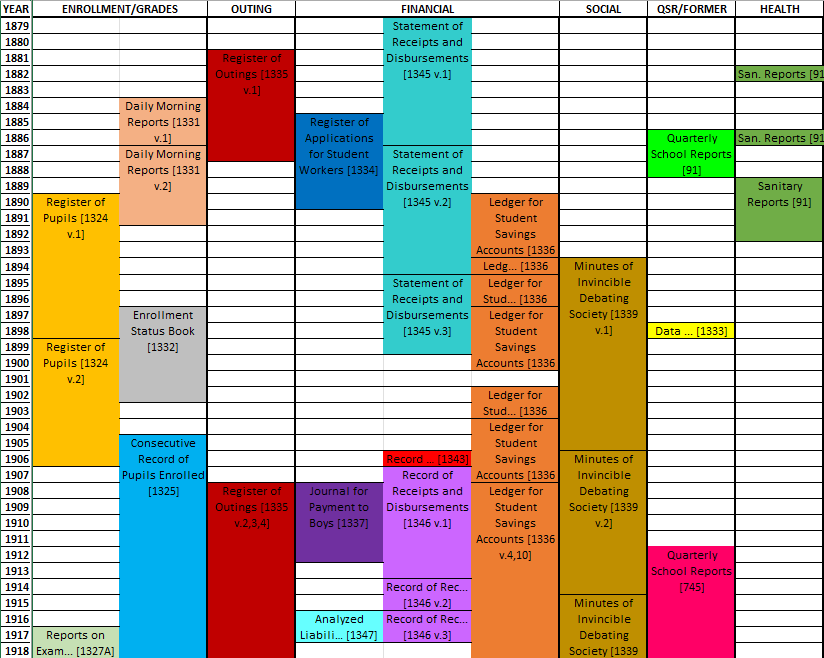
There are few enough ledgers that it is worth looking through the list to find any and all ledgers that cover your student-of-interest's time period as you never know what might come up. Across the school’s history, no ledger for enrollment, outing, or minutes survive for all 39 years. This diagram shows what years they do cover.