
See the end of this page for a PDF copy of this guide.
Searching Strategies
To facilitate research, CISDRC staff have chosen one form of a person’s name to serve as the name that connects all relevant documents. That means that, if you do not use that one form, your search may not pull up all of the documents about the person. But we have written all of the variations of the student’s name that we have found in school documents in the description of their student card and/or file. This means that your search will at least find that card or file and then you can use the People tag to find other documents. So, if you search with any one of the name configurations in the school records, then a record will appear. Although this helps in many circumstances, the best strategy to find someone’s student records remains to try, try again. Use different spelling variations, try out a nickname or abbreviated form of a name, or narrow down the records under “Explore Student Records” if you know their tribal affiliation.
You might want to go broad—use only a first or last name, or even use the first half of the person’s name and see what kind of results you get. With other background information (like their tribal community and year of entry) you can sometimes narrow things down using the filters on the Student Records landing page. That background information will also come in handy because you could come across records for multiple people by the same name (either another student, an outing patron, or a student’s relative). In the future, CISDRC staff intend to add explanatory notes to make it clear which records belong to which people.
If you cannot find anything, consider whether this person may have gone to another Native American boarding school—you can look at the map that the National Native American Boarding School Healing Coalition has compiled: https://boardingschoolhealing.org/digitalmap/. Or you can reach out to us at the CISDRC (cisproject@dickinson.edu) to ask if we can help.
Below are additional explanations of minor variations in our search functions and examples of different name variations which might catch you off guard.
Extra Information on Searching
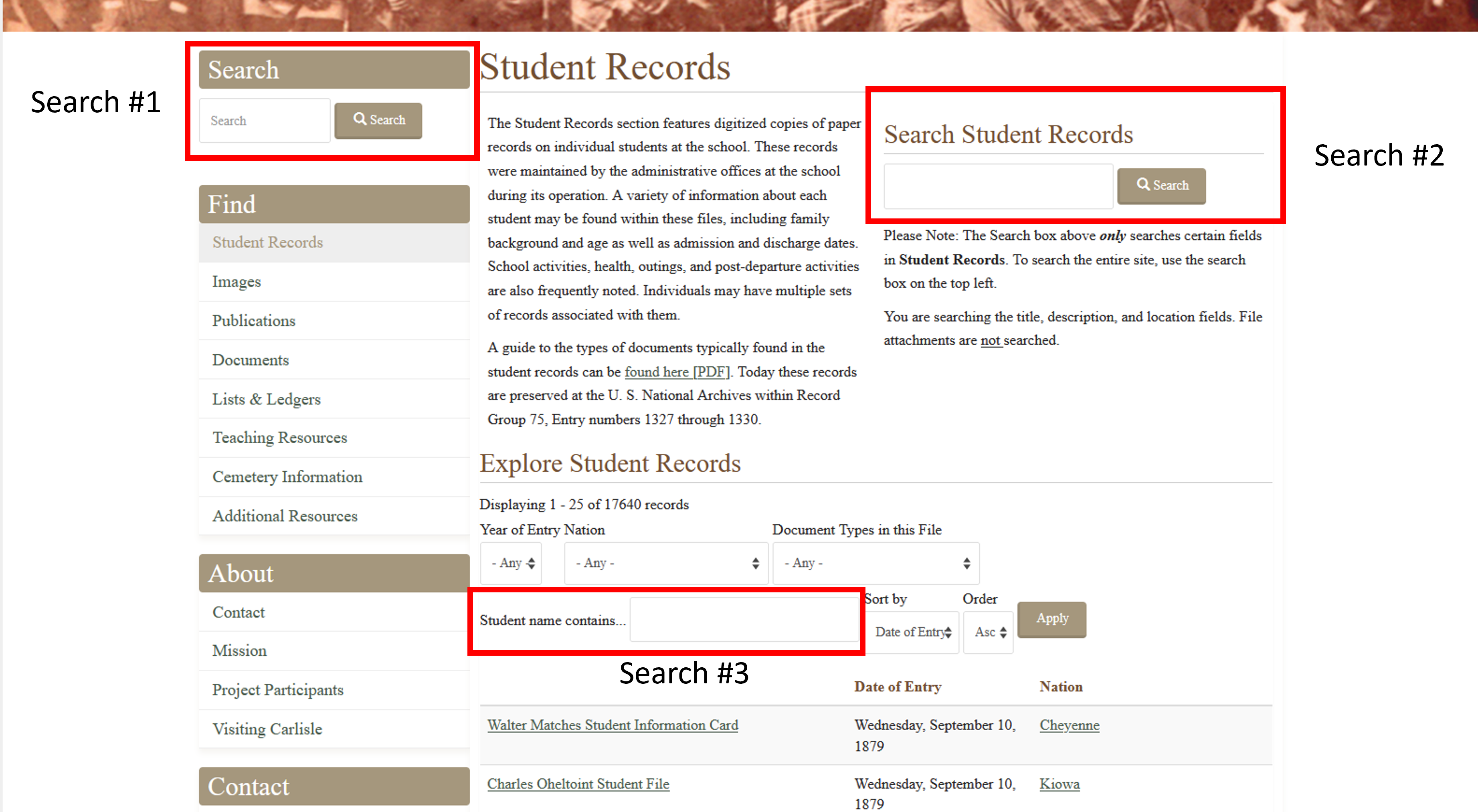
Depending on what search bar you use, you may get different results with the same search term (and may not be able to find your desired records). The three searches for student records go from broadest to narrowest, which means that searching in a certain way might make it appear like we do not have any records for the Carlisle student you are researching. None of the searches are case-sensitive—you do not need to watch for exact capitalization—but all of them are sensitive to spaces.
Search 1 (Left-hand Navigation): This search will pull up records from across the whole site, so you may get a newspaper clipping, a ledger, and a student record. It will not only search the main name information, but also the alternate names list we have placed on each student’s main post. Sometimes this can create a very long list of records since it also searches the contents of the school newspapers. If you are searching for a student record and you do not see an obvious match in the first page, consider using one of the other search functions so that you have fewer results to look through.
Search 2 (Landing Page): This search will also pull up a record if you have searched for one of the alternate names, but it will only give you student records, no newspapers or images, etc. Your search term must match the exact spelling of the main name or an alternate name in order for the record to appear. The results of this search will show the post name, student’s nation, date of entry, a segment of the descriptive paragraph (including when they left the school), and the record location. That means there might be some helpful details to confirm that this person is for whom you are looking. It can also help you look up a specific date and see who might have entered then.
Search 3 (Explore Student Records): This search also only pulls up student records but can only use the main name spelling—no alternate names will work. However, the sorting function can help narrow things down. If you use sort functions (like Nation or Year of Entry), with a search for part of a person’s name you can then parse through the results from there. Unlike Search 2, which shows more detail about this record, this search will only show a post’s title, the student’s date of entry and Nation. It sometimes works best to use segments of a name, like a first name or a part of the last name.
As an example of how the different searches respond to different search terms:
| Search Term | Search One | Search Two | Search Three |
| Charles Thunder Hawk | [located records] | [located records] | [located records] |
| Charles Thunderhawk | [located records] | [located records] | [did not locate records] |
| Charles Hawk | [located records] | [did not locate records] | [did not locate records] |
Common Variations That Might Trip You Up
In the context of the names of those who attended CIS, there are a couple of possible circumstances where your search term won’t match the school records. These variations sometimes happened because CIS staff who created the records used different spellings from record to record or a student themselves chose to use a different name when writing a letter as a former student. These are a couple of common types of variations, though this is not comprehensive.
- A name may have a couple of common spelling variations, all of which could be “correct.”
- One of the most commonly “multi-spelled" last names is Schenandore (or Schanandore or Schenandoah, etc.). Powlas is another (Powless, Powlass, etc.), as is Jimerson (Jamison, etc.)
- Commonly “multi-spelled” first names includes Sarah (Sara), Louise (Louisa), or Louis (Lewis).
- A student’s last name can have two words or one word (or have hyphens).
- For example, Clyde Red Eagle (Clyde Redeagle) and Alfred Heap-of-Birds. Another version of this is a name like La Mere (Oliver Lamere versus Oliver La Mere).
- The first part of the last name may be abbreviated too. For example, some documents spell Charles Thunder Hawk’s name as Charles Thunderhawk or Charles T. Hawk.
- A middle initial can sometimes confuse the search.
- For example, Morris Huff versus Morris H. Huff.
- Students may also have a nickname or abbreviated first name.
- A number of students are identified as both Elizabeth and Lizzie.
- Students named Charles may also go by Charlie (which itself may have a spelling variation like Charley). For example, Charles and Charlie (Charles Pratt) and Charlie and Charley (Charlie Foster).
- Or both a middle initial and a changed first name in the case of Anna Gilstrap (Annie V. Gilstrap, Annie Vivla Gilstrap)
- Finally, another reminder that a person could share a name with another person, be it another student (like John Davis or Alice Doxtator) or a non-student (Charles Thompson will pull up records for two students and another student’s parent).